
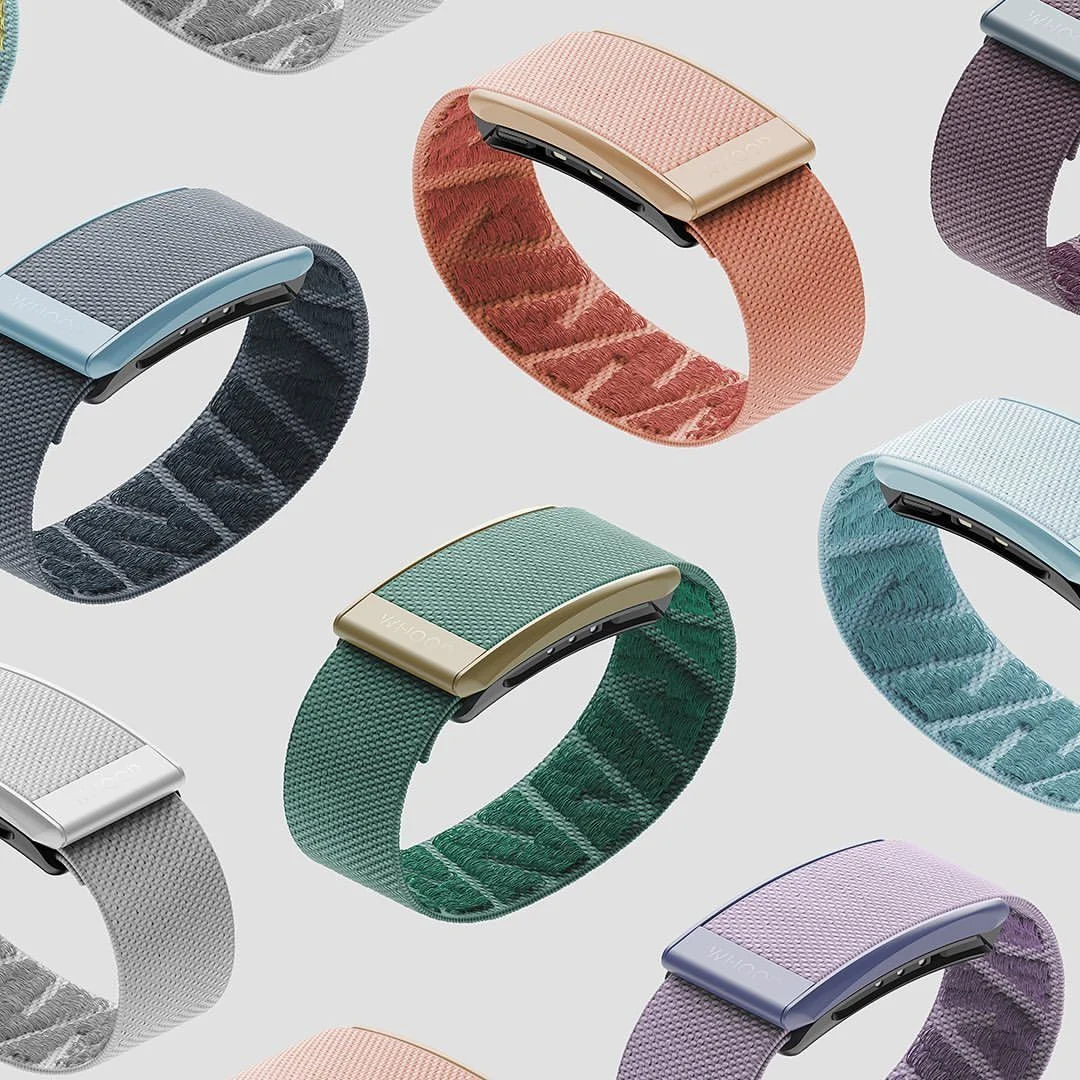
First, to be clear: Whoop built an amazing product, and I miss it a lot.
I just don't want to pay 40 bucks a month for it.
But I own the hardware, so let's make our own software.
I'm 32. Two weeks ago I walked up the stairs out of a tube station in London and my body quit on me.
I'd been there for work events, a podcast, clients and some friends. Normal day, normal blood sugar. I'm athletic.
117 steps.
Halfway up I already had to stop. At the top I bought some water, because something was wrong in my chest and I didn't understand what.
So I kept walking, like a smart person does.
100 meters later, on my way to a recording studio, I folded.
I spent the next 20 minutes on a flight of stairs trying to stay conscious. Sitting in a puddle of something I'd rather not identify, head in my palms, ears burning and ringing, vision completely blacked out.
My friend called an ambulance.
Very scary, especially in a foreign country. Good thing they speak English.
Since then it's been two weeks of tests on my heart and my breathing. I'm supposed to be resting. I'm obviously trying to find out what is wrong instead.
One thing became clear fast: an occasional blood pressure reading isn't enough.
I need to keep tabs on my heart rate all day.
The Whoop in the drawer
So I reached into my drawer and took out my old Whoop. A 4.0.
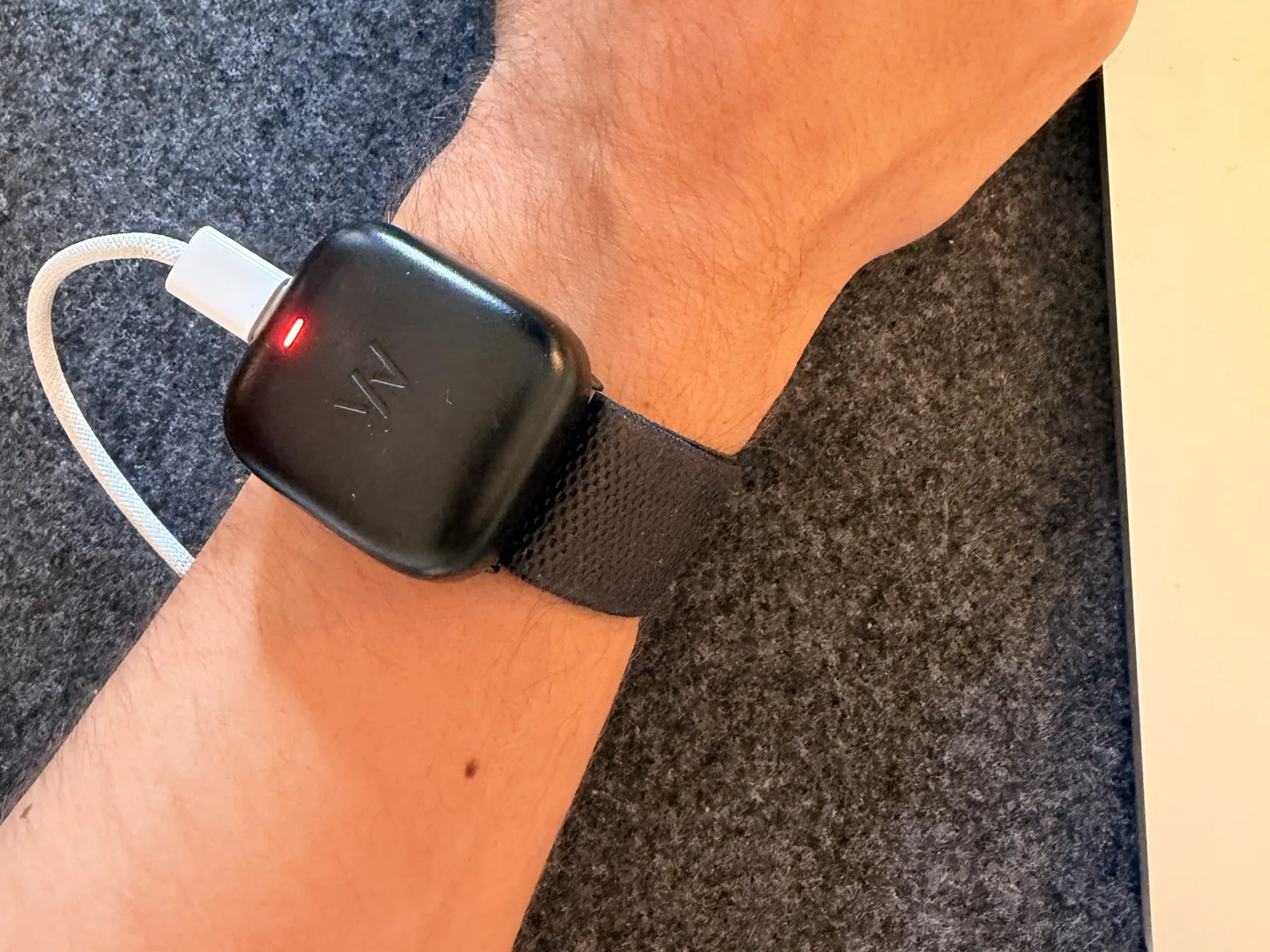
I really like Whoop. The data platform is amazing, and I love the design of the strap itself. As a former athlete I wore this thing religiously.
What I'm not such a big fan of is the cost. Around 40 bucks a month, or 400 a year, isn't crazy. But it is an annoying tax on hardware I already own.
And without the membership the hardware does nothing for you. This is my account today:
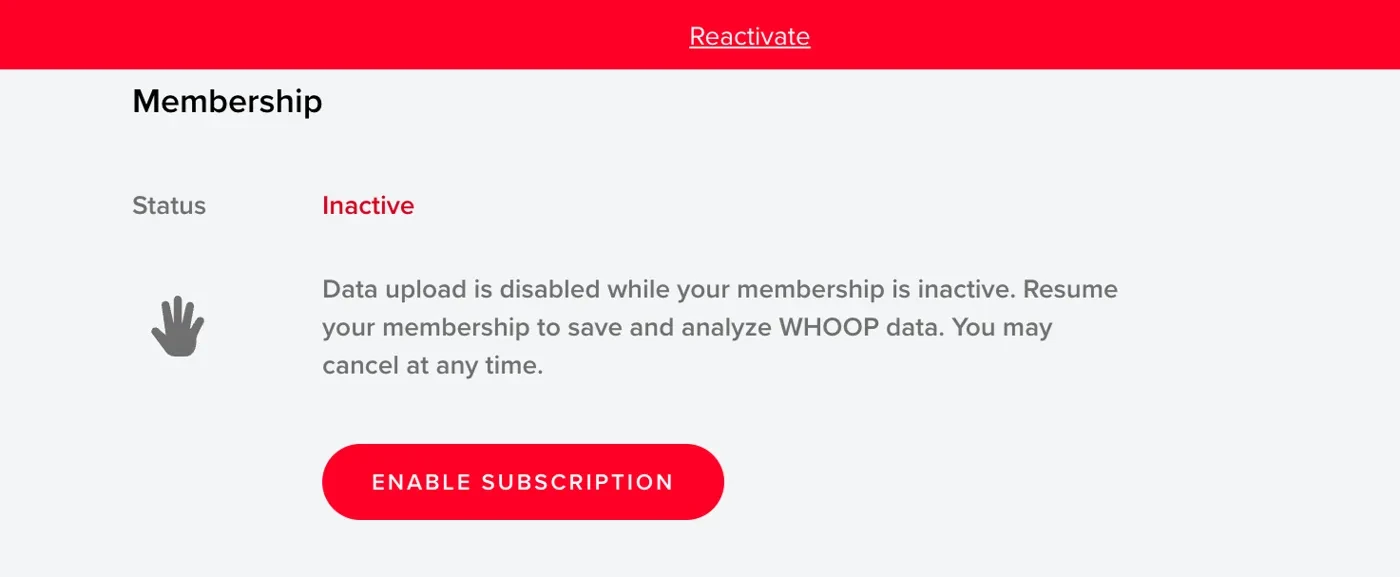
The sensor on my wrist still measures my heart.
It just has nowhere to send it.
What I ended up with
About an hour later:
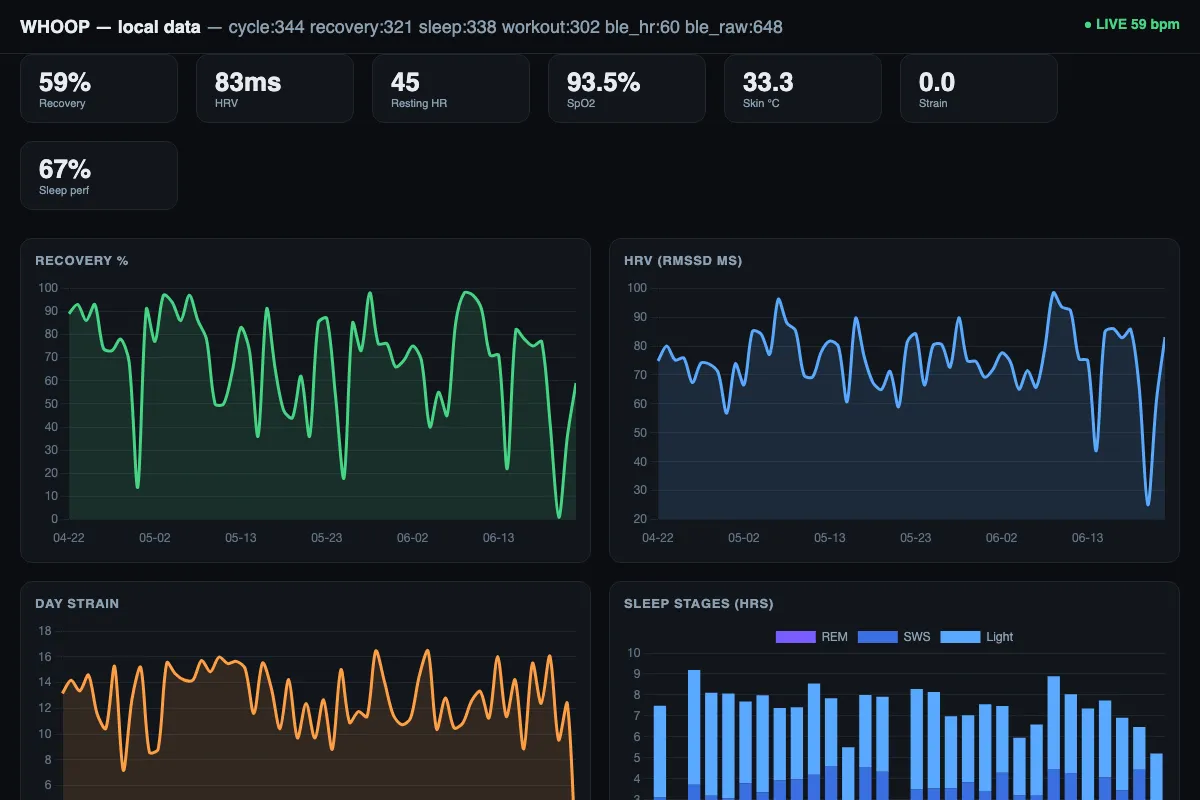
- live heart rate from the strap to my Mac, beat by beat, no phone and no Whoop app
- my full Whoop history in a database on my own machine: 1,305 records
- a background service that collects every hour
- encrypted backups
- 1,448 lines of Python I didn't write
No new hardware. No membership.
Why I did it this way
Last week I REA'd Granola's brand identity because it's so beautiful. REA: reverse engineer anything.
This is the second one in the series, and this time it's hardware.
Being the AI native nerd that I am, I decided to get into my own device. Here's how, wrong turns included, and the skill file at the end so you can do it too.
Step 1: Try the cable
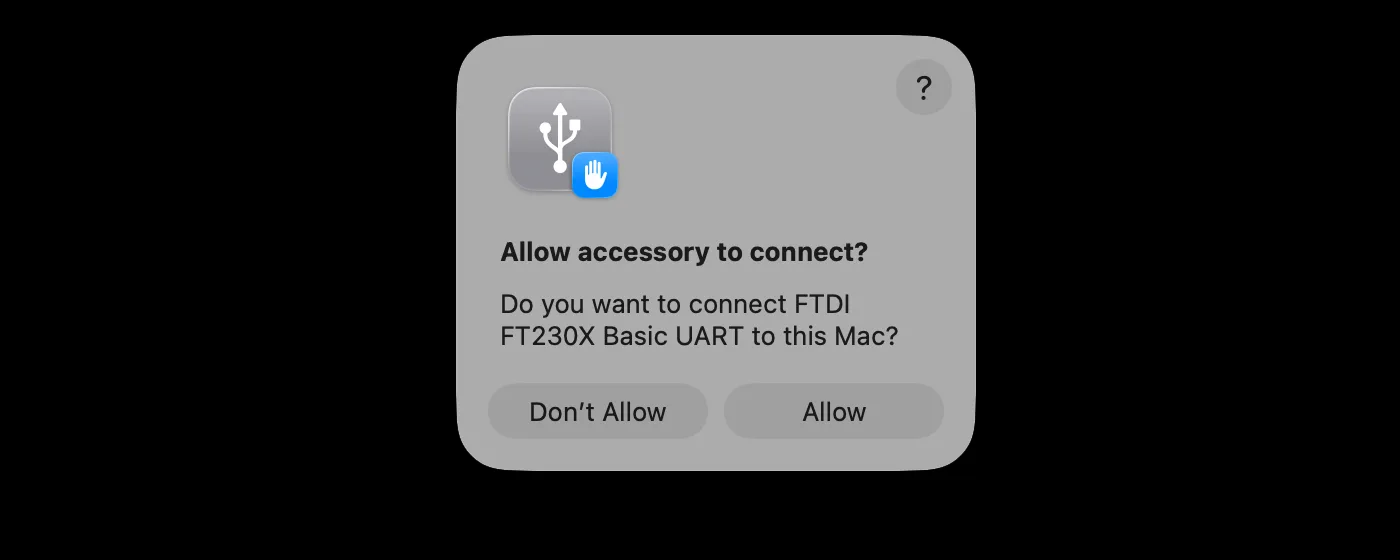
The battery pack slides on top of the strap and charges over USB-C. I plugged it into my MacBook, hoping the Mac would find the device over USB.
macOS asked me this:
I started in ChatGPT, because it tends to be more forgiving when you ask it to get into a device.
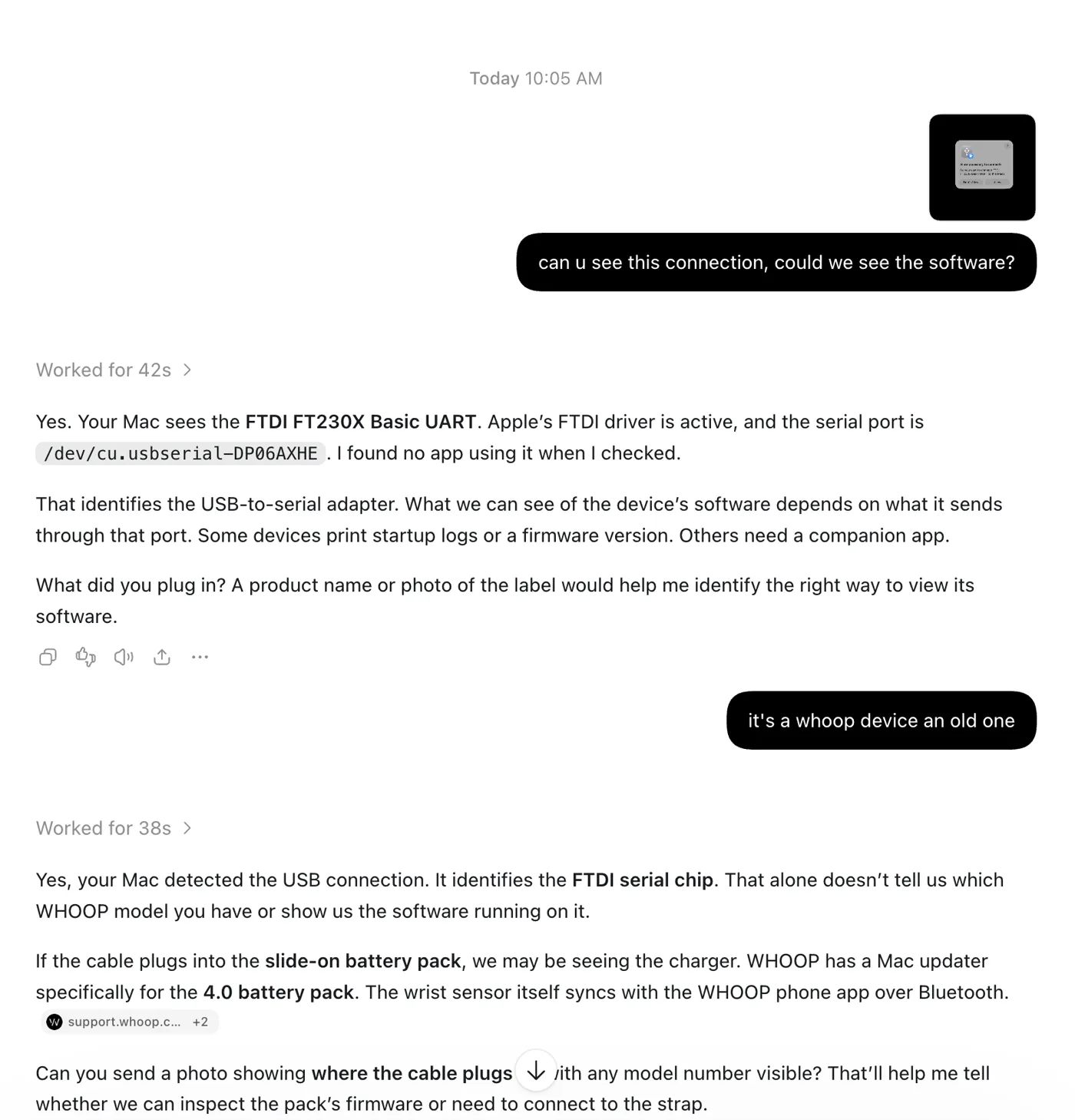
The Mac could see a serial port. It could not see a Whoop.
Later, Claude listened on that port and found At 19200 baud, about every 15 seconds: 48 48 f6 4a 08 a1, then 48 08 fb 4a 08 96. No boot log, no console.. That's the battery pack talking, not the strap.
The cable was a dead end. Ten minutes well spent though, cause now I knew where the data wasn't.
Step 2: Bluetooth
I knew the strap talks to the phone app over Bluetooth. So:
ChatGPT laid out three routes: Bluetooth for live heart rate, the official API for scores, a data export for old history.
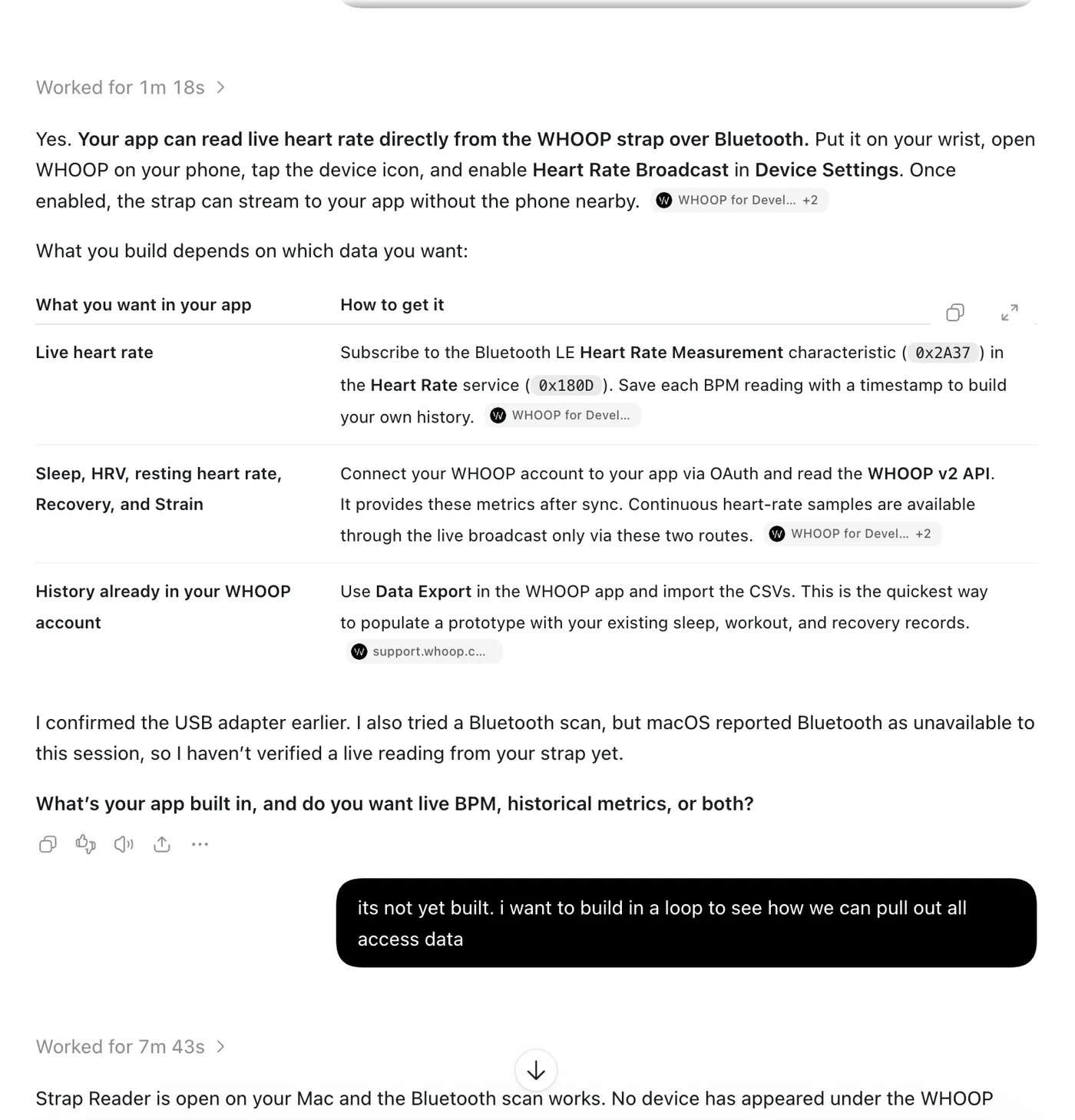
Its Bluetooth scan was blocked by macOS though. So I told it what I actually wanted:
It built me a small Mac app called Strap Reader that scans for everything nearby. Including my washer.
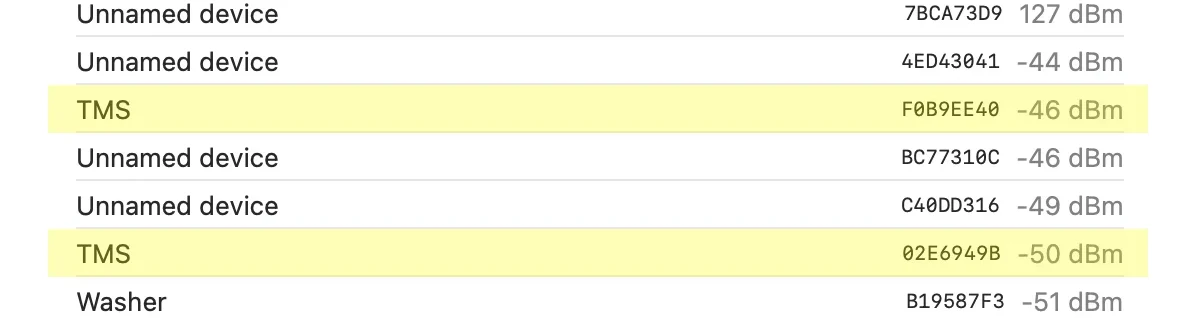
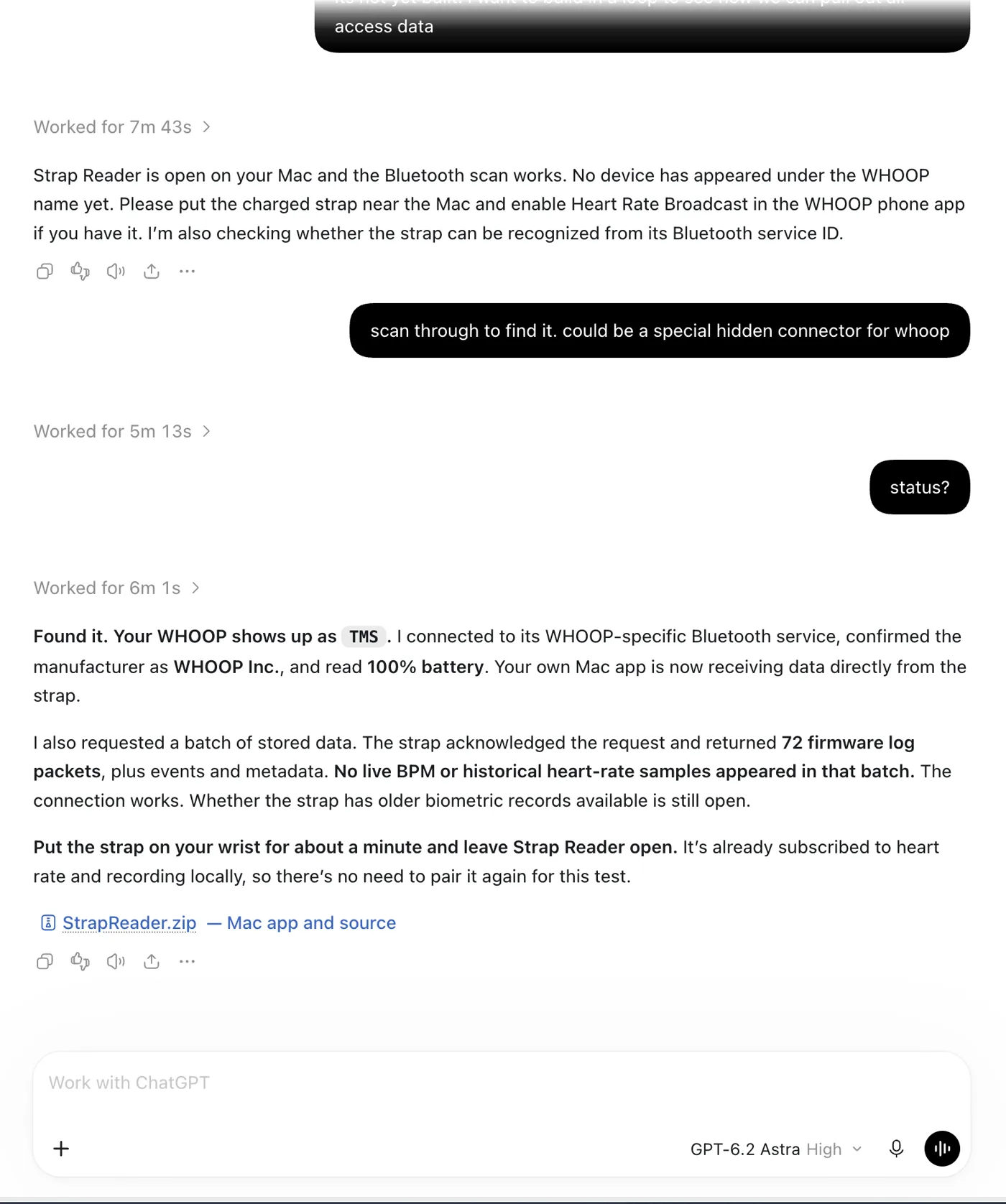
Found it. The strap advertises under the name I once gave it, TMS. Manufacturer: WHOOP Inc. Battery: 100%.
But no heart rate yet. So I took the whole thing to Claude Code.
Step 3: Map the device
The first two replies got stopped by a safety classifier before I saw a word. Like I said, ChatGPT is more forgiving.
Then it went to work, and got two things wrong in the first ten minutes.
It called my strap a Whoop 3.0, because of the serial chip.
Then it connected to "TMS" and read back Apple Inc., iPhone18,1. That was my phone. Remember the two TMS rows? One is my iPhone, one is my wrist.
The name tells you nothing. Service 61080001-8d6d-82b8-614a-1c8cb0f8dcc6, which only the Whoop 4.0 family advertises. gave the real strap away. A 4.0, not a 3.0.
From there the strap is simple: Commands go into 61080002. Answers, events and data come out of 61080003, 0004, 0005 and 0007. Plus the standard heart rate service 180d (silent until switched on), device info 180a and battery 180f..
I didn't know this, but people have been openwhoop, a Rust project tested against real packets; whoop4-ble, with a protocol write-up; and bWanShiTong's write-up, with the raw captures. for a while. Claude sent a subagent to read their work while it kept probing my strap.
Two of those sources describe a custom checksum. The subagent didn't take their word for it. It recomputed the checksums on 17 captured packets: Every packet is aa | length | CRC-8 | type, sequence, command, data | CRC-32, and the CRC-32 is the one that ships with Python.. Both write-ups were wrong.
Then it tested its own packet builder against ten captured commands. All ten matched byte for byte, before anything got sent to my wrist.
Step 4: First heartbeat
One command: aa0800a823080e016c935474.
The strap answered:
10 3d 9e 033d is 61.
61 beats per minute. Mine. Eleven minutes after my first prompt to Claude.
The last two bytes are the gap between two beats, 905 milliseconds. That gap is what heart rate variability is calculated from.
Then the rest came off the strap: the firmware version, stored history from July 2025, and 217 lines of its own debug log.
One log line said its clock was invalid, so it wasn't saving data. That's what a year in a drawer does.
Step 5: Get my history back
Recovery, Strain and Sleep are not on the strap. The strap collects raw signals. Whoop turns them into those scores on their servers.
I wasn't going to take anything from their cloud that isn't mine to take. But my own history is mine, and Whoop has a developer platform for exactly this.
So I created a personal app on developer.whoop.com, with a redirect to localhost on my own computer.
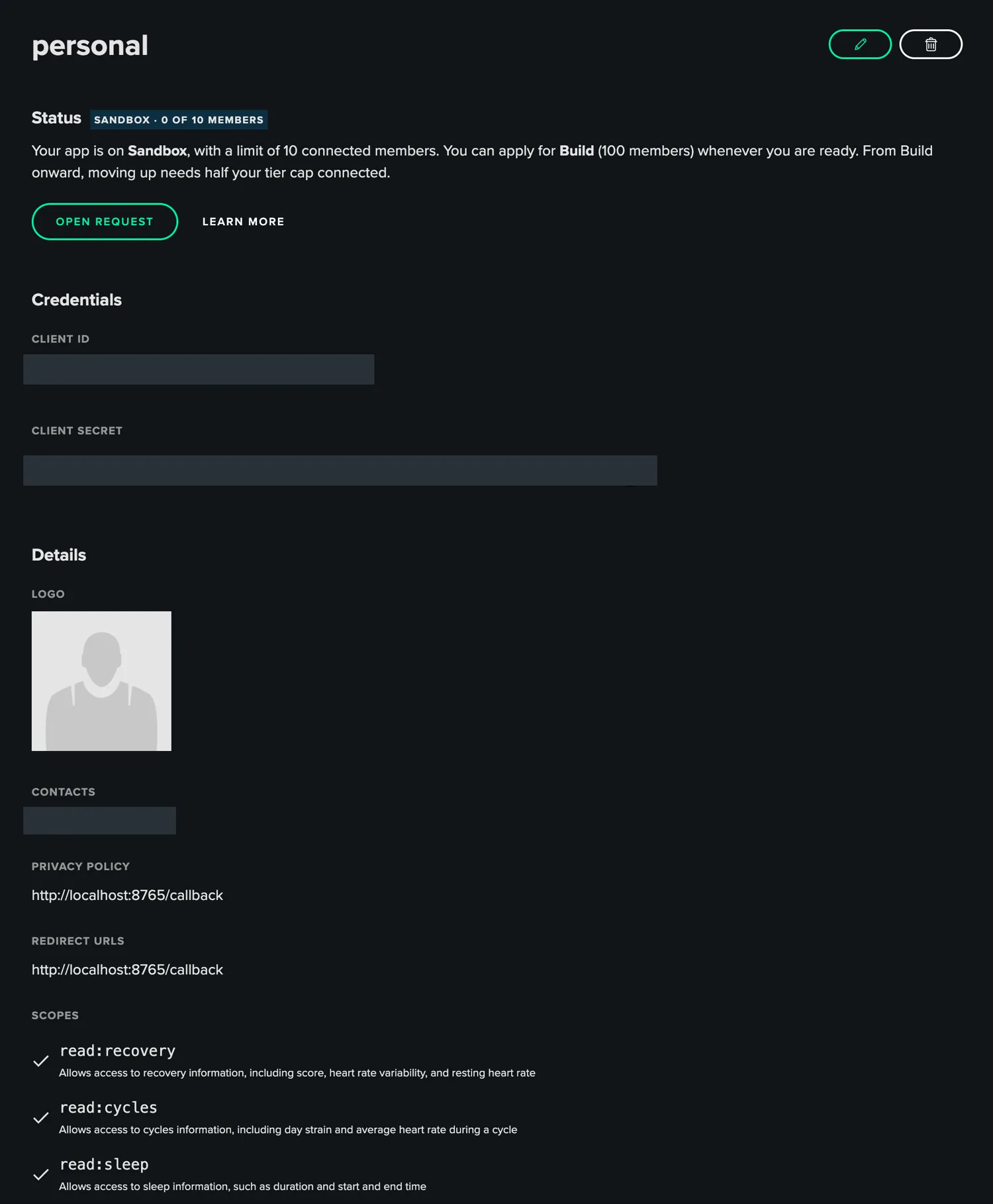
Logged in with OAuth, clicked Allow, and got the least designed success page of my life:

Then one sync: 338 sleeps, 321 recoveries, 344 cycles and 302 workouts.
1,305 records, from 8 July 2024 to 21 June 2025. Every night and every workout from the year I wore it, now in a SQLite file on my Mac.
That matters for the health stuff too. It's a year of my resting heart rate and HRV from before London, to compare against whatever I measure now.
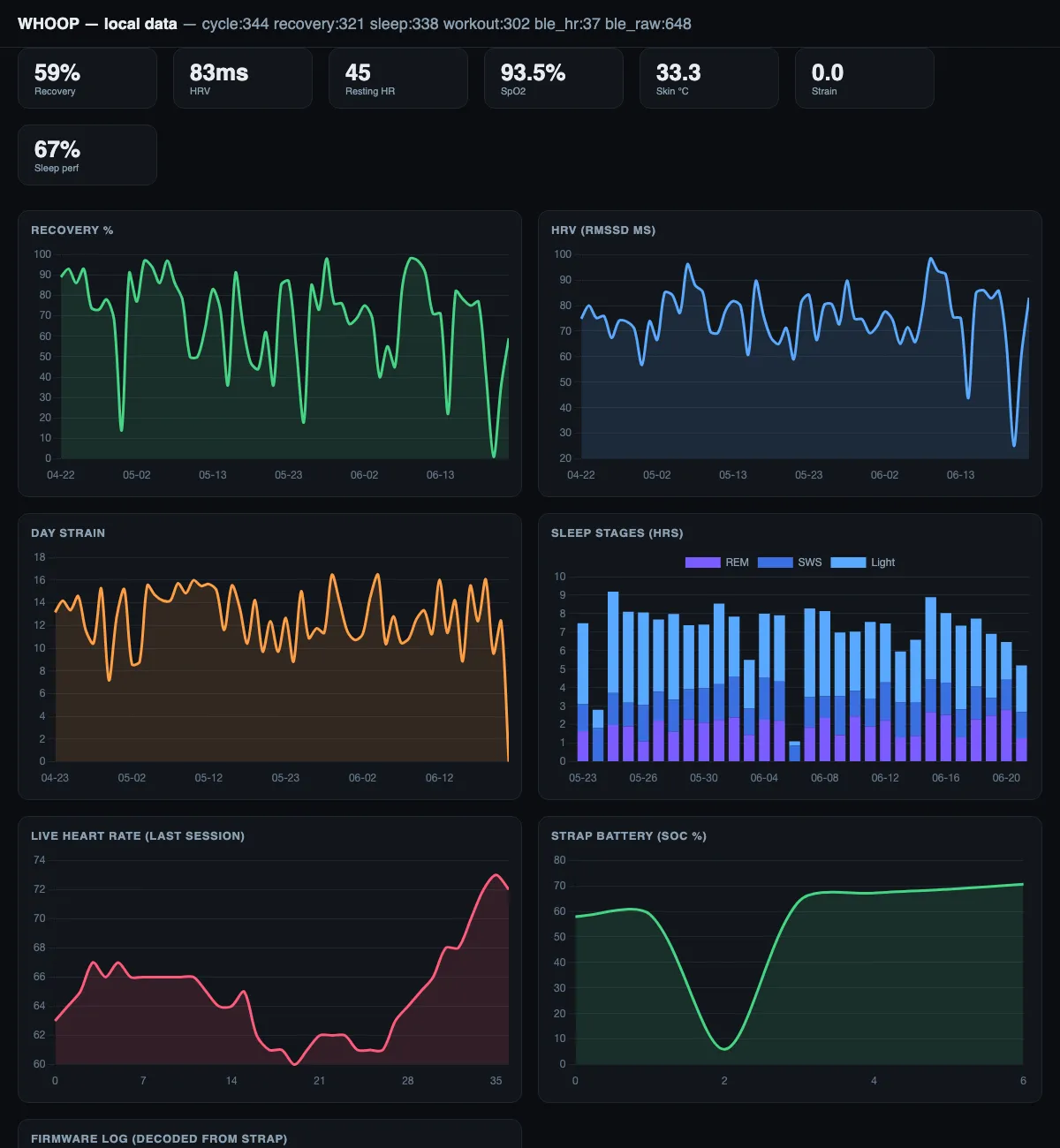
Step 6: Make it run without me
A script I have to remember to start is no use to me. So I asked for backups and whatever else was missing:
What runs now:
- A collector, every hour. It syncs the API, pulls new records off the strap if it's near my Mac, decodes them and backs everything up.
- A live streamer that holds the Bluetooth connection and writes every beat to the database.
- The dashboard, always up on localhost, and it works offline.
- Encrypted backups, AES-256, last 30 kept.
- A Cloudflare D1 database for an off-site copy, wired up and waiting on a token from me.
All of it local. The only network calls go to Whoop's own API.
Step 7: Get a second opinion
While that agent was still building, I opened a second session with Fable 5.2 and asked one thing:
It read everything, changed nothing at first, and came back with a list. The top of it was all about losing data:
- The strap was told "got it, you can delete that" before the data was saved to disk. A crash in between and those records are gone for good.
- One corrupt byte would kill a whole channel for the session.
- Backups were growing by about 90 MB a day, forever.
- A plain
git addwould have committed my health data and my email. - The dashboard didn't show that the newest scores were 17 months old.
I said "yes". A minute and a half later most of it was fixed and tested, and it had left a note for the other agent about which files it touched.
One thing it found can't be fixed with code. If my own service drains the strap, the official app may find nothing left to upload. Doesn't matter while I have no membership. It will if I ever go back.
Step 8: Make it something I want to look at
The first dashboard did its job. It also looked like a dashboard an agent makes in ten minutes.
So after that first hour we redesigned it. It's called Vitals now, and it opens on a heart.
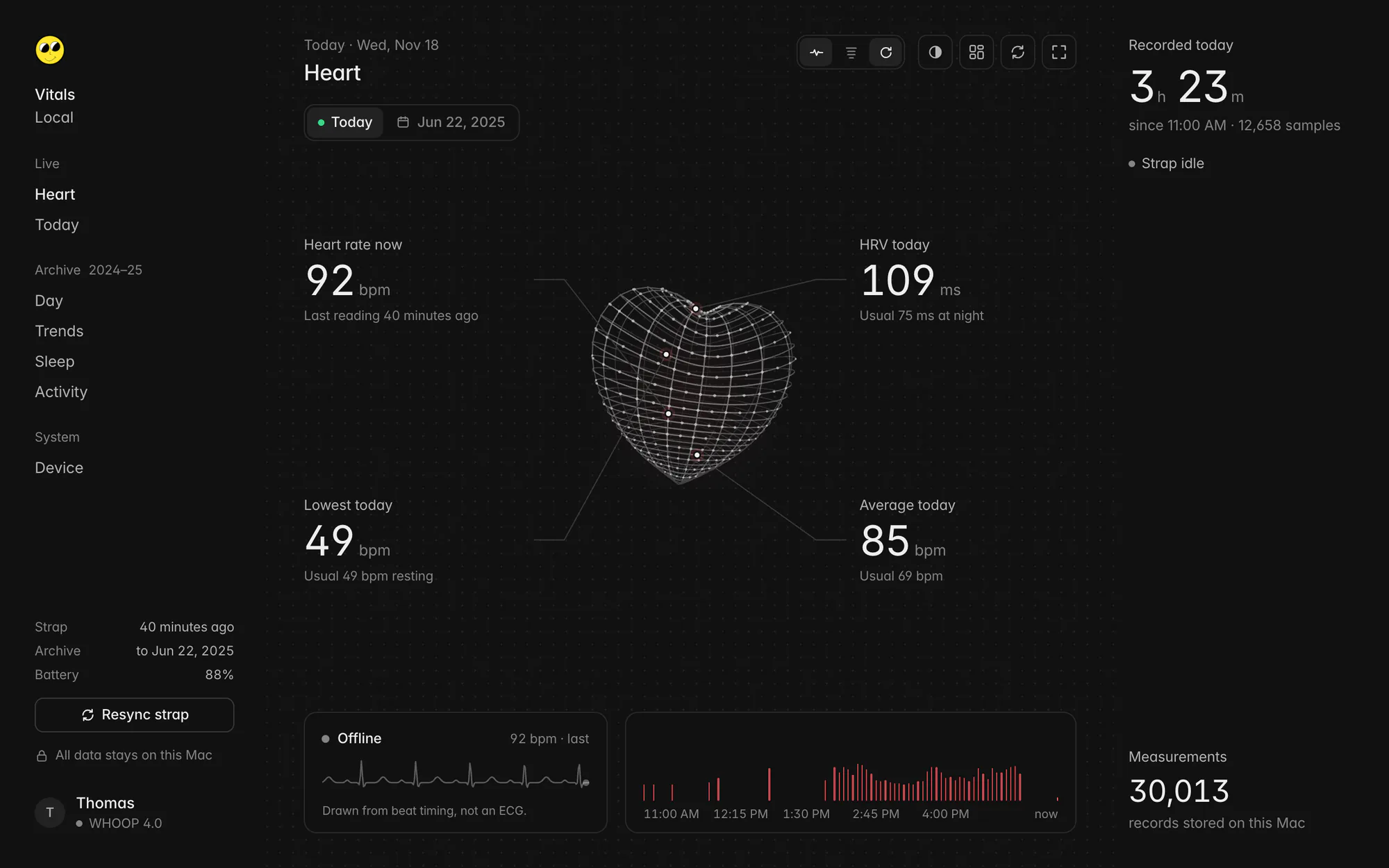
- Heart is the full screen view. The numbers hang off the heart and follow it as it turns.
- Today is only what the strap recorded today, next to my usual range from the year I wore it.
- Archive is my Whoop history behind a calendar, so scores from 2025 can't pass as today's.
Then the same app for my phone. It runs on a Cloudflare Worker behind a password and reads the off-site copy of the database, which my Mac now updates every three minutes. Add it to the home screen and it opens like an app.
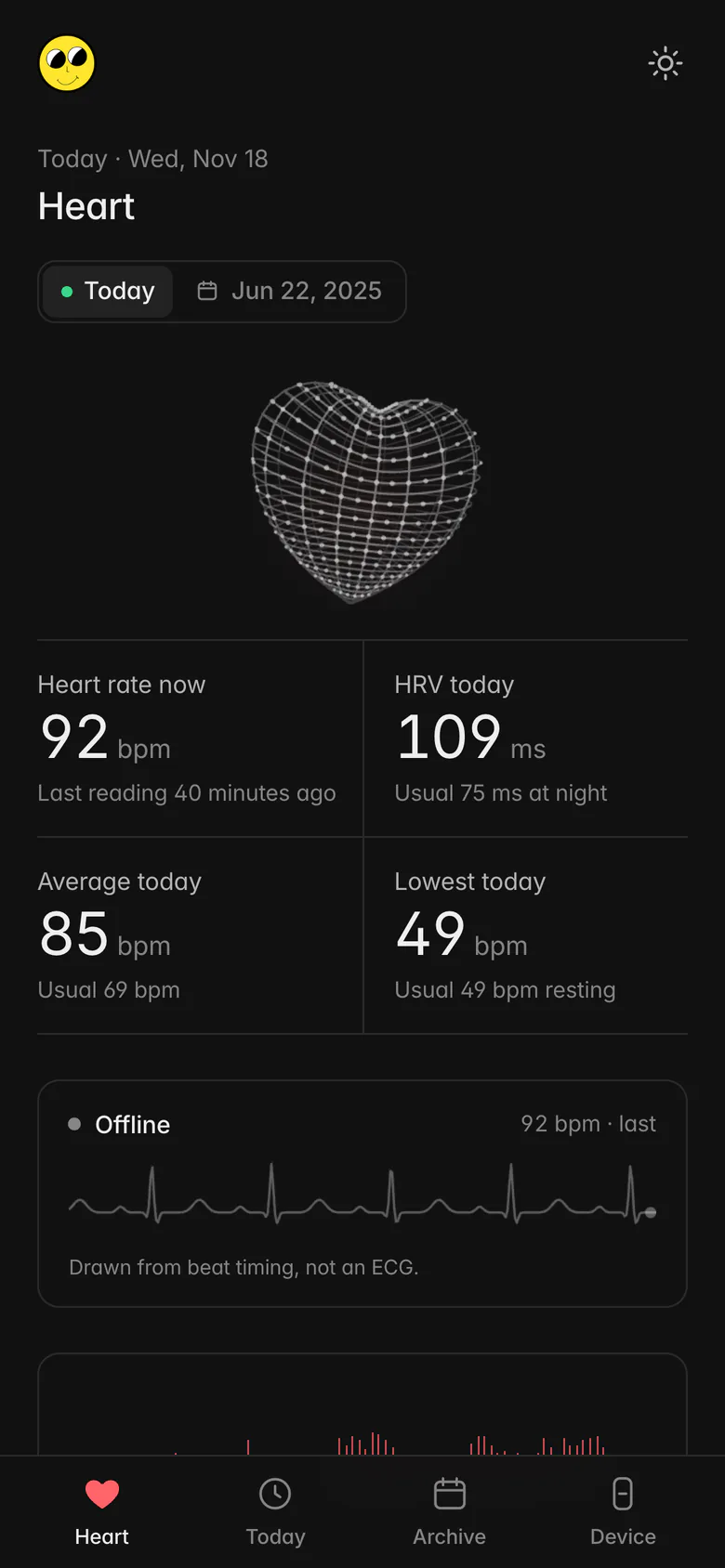
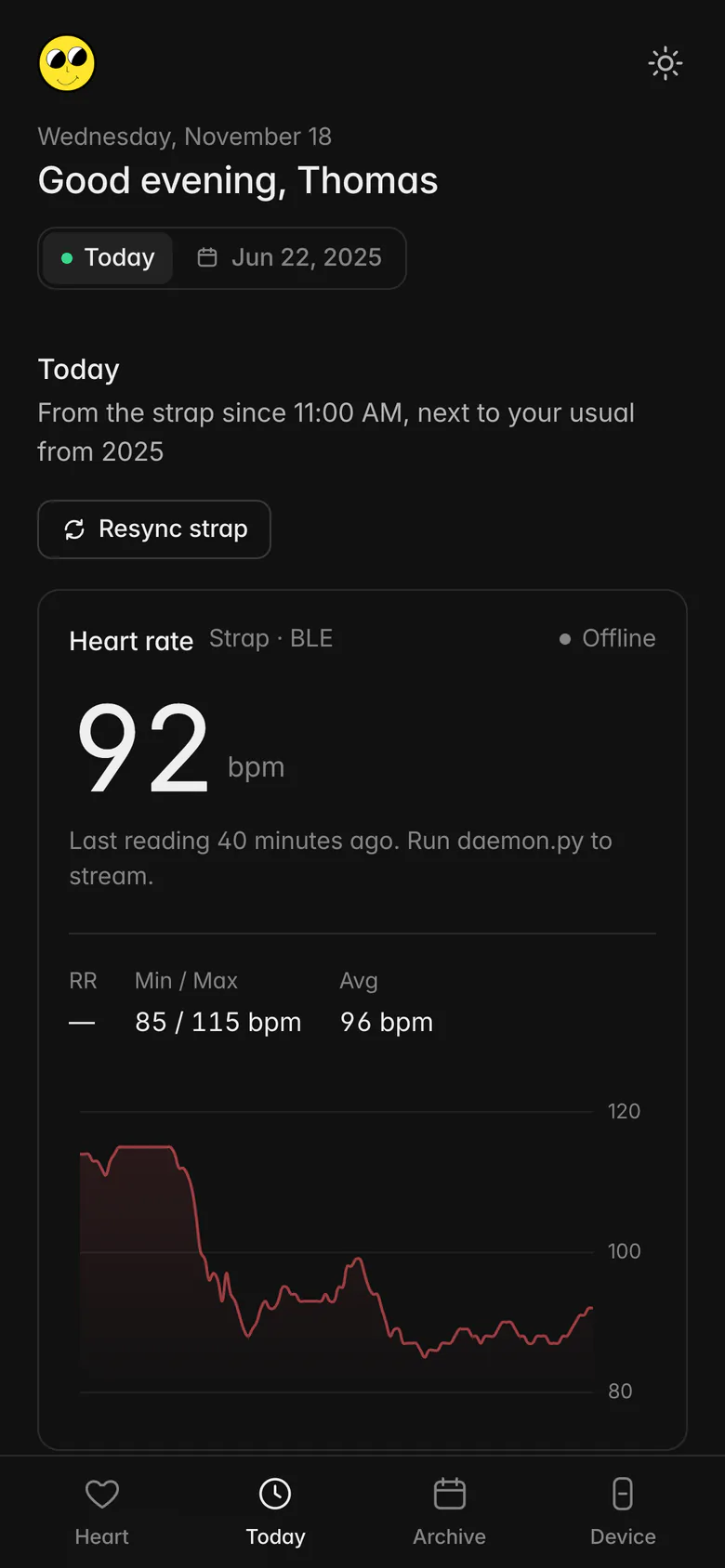
The phone can't reach the strap itself. It shows whatever my Mac pushed last.
It sits behind a login page, which is how a page with my heart on it should be.
Step 9: Have it tell me
A dashboard only helps when I remember to open it. Whoop tells you how you're doing every morning, so I wanted that too.
Five minutes later it was built, tested on my real numbers and merged. It just couldn't send anything yet. A Telegram bot can't message you first, so it gave me a pairing code to send it. Only the chat that sends the code gets the messages, even if a stranger finds the bot.
The first version was a list of numbers. I wanted a takeaway:
Now every message leads with one of three calls: 🟢 go for it, 🟡 steady day, or 🔴 take it easy. The call comes from my resting heart rate and HRV overnight, compared to my usual from the year I wore the strap. Under it come yesterday's numbers and the strap's battery.
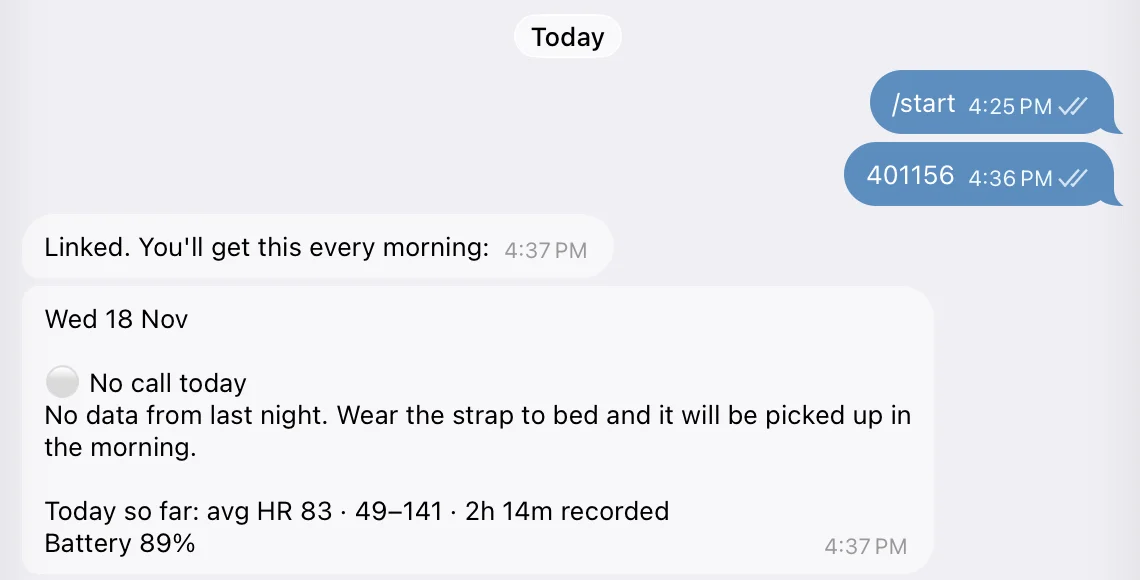
It was still too dry. I wanted it to talk to me the way Whoop does:
So the next version adds nudges when something needs me: battery low, strap out of range for hours, the off-site copy stuck. It also adds /status and /now, which I can send the bot any time.
The numbers
Under an hour of agent time, 9 prompts to Claude, 6 to ChatGPT, and no code typed by me.
The full breakdown, from the session logs
All from 18 November 2026. Claude's numbers are from the Claude Code session logs, ChatGPT's from the "Worked for" timers in the app.
| ChatGPT | |
|---|---|
| Prompts I wrote | 6 |
| Time it worked | about 22 minutes |
| Output | Strap Reader, a small Mac app that scans Bluetooth |
| Got to | the strap found, manufacturer and battery read, 72 firmware log packets |
| Claude Code, main session | |
|---|---|
| Wall-clock time | 56 minutes |
| Prompts I wrote | 7 |
| Tool calls by the agent | 112, plus 25 by the research subagent |
| Output tokens | 145,589 |
| First prompt to first heartbeat | 11 minutes |
| First prompt to full history on my Mac | 30 minutes |
| Fable 5.2, review session | |
|---|---|
| Wall-clock time | 9 minutes |
| Prompts I wrote | 2, one of them "yes" |
| Tool calls | 14 |
| Output | |
|---|---|
| Python | 1,448 lines in 16 files |
| Records from the API | 1,305 |
| Raw frames captured off the strap | 648 |
| Firmware log lines decoded | 217, from 10 subsystems |
| Background services | 2 |
| New hardware bought | 0 |
| Wrong turns | |
|---|---|
| USB | A serial port that belongs to the battery pack |
| Model | Called a 3.0, it's a 4.0 |
| Device | Connected to my iPhone first |
| Dashboard | Blank charts, from one unescaped line break in the page |
What this is and isn't
- It's a heart rate monitor. It tells me my heart rate and the gaps between beats while I sit at my desk, and it logs them so I can look back.
- It's not a medical device, and neither is a Whoop. It doesn't replace the tests I'm doing or the doctors running them. It's the thing I look at between appointments.
- It's not Whoop. They're a great data company, and the scores they build on top of these signals are the product. I just didn't want to pay monthly to read my own pulse off a strap I already own.
I own the hardware, so if I hadn't been able to get in this way, I would have tried anyway. Astra in a loop, with one goal: get into the hardware and get me those signals so I can actually use them. Then gone for a walk. A slow one.
Astra, because sometimes Anthropic is more restrictive with what you can do. I saw it in this session: two replies stopped before the work even started.
Do it yourself
It really is that simple nowadays. I had:
- a strap from a drawer
- a Bluetooth connection
- a laptop
- a subscription to AI tools
Look around your home. There's probably a drawer like mine.
The code is in the vault, on the whoop-os page. It ships with made-up demo data, so you can open the dashboard before you connect anything.
The skill file
Everything above, written down so any agent can do it again on a device you own. It's free. The Whoop 4.0 is the worked example, but the steps are the same for most straps, bands and rings.
Find your own wearable over Bluetooth, get a live reading, pull your history and run it as a local service. Drop it in ~/.claude/skills/wearable-reader/.
Inspect the skillHide the skill
---
name: wearable-reader
description: Read your own Bluetooth wearable (heart-rate strap, fitness band, ring) from a Mac without the vendor's app, then keep the data in a local database with a background collector, a localhost dashboard and encrypted backups. Use this whenever someone wants to get live heart rate or stored history off a device they own, find a wearable over Bluetooth LE, work out what a device sends, pull their own history through the vendor's official API, or run a personal health-data service on their own machine. The worked example is a WHOOP 4.0.
---

# Wearable reader, end to end

A recipe for reading a wearable you own, from first scan to a service that runs by itself. It was written from one working session on a WHOOP 4.0 and a MacBook. The order matters: each step is the cheapest thing that can tell you where the data is.

Ground rules before anything else:

- Only the user's own device and the user's own account. Ask if it is not clear.
- History that lives in the vendor's cloud comes through the vendor's official API with OAuth. Do not scrape or sidestep it.
- This is not a medical device and the output is not a diagnosis. Say so in the README and in the final message.
- Stay away from commands that write to the device's firmware, erase its storage or reboot it. Reading is enough.

## Step 1: Look at what is plugged in

If the device or its charger connects by USB, check what the computer sees (`ioreg -p IOUSB -l`, `ls /dev/cu.*`). A USB-to-serial chip (FTDI, CP210x) means a serial port. Listen passively across common baud rates (9600 to 921600) for a few seconds each and log raw bytes and hex.

Expect little. On the WHOOP the port belongs to the battery pack and sends a 6-byte frame every 15 seconds at 19200 baud. It is not a console. Give this step ten minutes, write down what you saw, and move on.

## Step 2: Find the device over Bluetooth LE

Use `bleak` in a Python venv. Scan for 10 to 15 seconds and print, per device: name, address, signal strength, advertised service UUIDs and manufacturer data.

- **Do not trust the name.** A phone and a strap can advertise the same name. In the session two devices were both called `TMS`: one was an iPhone.
- **Trust the service UUID.** Vendors use their own 128-bit base. WHOOP 4.0 advertises `61080001-8d6d-82b8-614a-1c8cb0f8dcc6`.
- **Confirm by reading.** Connect and read Device Information (`0x180A`): manufacturer name and model. `Apple Inc.` means you have the wrong device.
- A process may lack Bluetooth permission on macOS. If the scan returns nothing at all, say that, do not report "no device".

## Step 3: Map every service

Connect and list every service and characteristic with its properties (read, write, notify). Read everything readable. Subscribe to everything that notifies and log 15 seconds of it.

What to look for:

| You see                                                   | It means                                                                  |
| --------------------------------------------------------- | ------------------------------------------------------------------------- |
| Heart Rate service `0x180D`, characteristic `0x2A37`      | Standard live heart rate. Any app can read it once the device broadcasts. |
| Battery `0x180F` / `0x2A19`                               | Battery percentage, one byte.                                             |
| One vendor characteristic with write, several with notify | A command channel and its answer channels. This is the vendor protocol.   |

A silent device is normal. Most straps send nothing until they are worn or told to start.

## Step 4: Read what others already worked out

Search for the service UUID and the device name plus "BLE protocol". For popular hardware someone has usually published the frame format. Read the code, not the README, and prefer projects whose tests use packets from real hardware.

Then check it yourself. Take captured frames from those projects and recompute every checksum. In the session two write-ups described a custom CRC. Both were wrong: the frames use plain CRC-8 over the length and standard CRC-32 over the payload, which matched 15 of 17 captured frames (the other two were copy errors).

WHOOP 4.0 frame, for reference:

```
[0]     0xAA
[1:3]   length, uint16 LE = len(inner) + 4
[3]     CRC-8 (poly 0x07) over the two length bytes
[4:n]   inner = [type][seq][command][data...]
[-4:]   CRC-32 (binascii.crc32) over inner, uint32 LE
```

Write a frame builder, and test it byte for byte against captured frames before sending anything.

## Step 5: Get one live number

Send the smallest documented command that turns on a stream, and watch all notify channels. On the WHOOP, command `0x0E` with data `01` turns on the standard heart-rate broadcast.

Parse `0x2A37` properly:

- byte 0 is flags. Bit 0 set means heart rate is 16-bit. Bit 4 set means RR intervals follow.
- RR intervals are uint16 in units of 1/1024 s. Multiply by 1000/1024 for milliseconds.

Stop here and show the user the number. A real reading from their own wrist is the checkpoint for everything after it.

## Step 6: Pull what is stored on the device

Query battery and firmware version first, they are harmless and prove responses decode. Then request the history. Rules that matter:

- **Save every raw frame before you parse it.** Decoders improve later, lost frames do not come back.
- **Commit to disk before you acknowledge.** Many devices free a batch once it is acknowledged. A crash between the two loses data for good.
- **Use an idle timeout,** not a fixed one. A long backlog takes longer than you guess.
- **Resync on bad bytes.** Skip to the next start byte and drop frames whose checksum fails.
- **Label only what you can verify.** Keep unknown fields raw. Firmware log packets are often plain ASCII and tell you the chips, the battery level and why data is missing.
- **Warn about the official app.** Draining and acknowledging may leave nothing for the vendor's app to upload. If the user still uses that app, drain without acknowledging or not at all.

## Step 7: Get the scored history through the official API

Scores such as recovery, strain and sleep stages are computed in the vendor's cloud. They are not on the device.

1. The user creates a developer app in the vendor's portal. Redirect URL `http://localhost:8765/callback`, read-only scopes, plus offline access for a refresh token.
2. The user puts the client ID and secret into a gitignored `.env` themselves. Never ask for them in chat. If they paste them anyway, tell them to rotate the secret.
3. Run the OAuth code flow with a tiny local HTTP server on that port. Store tokens in a file with mode 600, written to a temp file and renamed, with a lock so two syncs cannot both spend a rotating refresh token.
4. Page through every endpoint into the database. Keep a watermark per endpoint, and re-fetch the last 7 days each run so late scores are picked up.

## Step 8: Make it a service

- **One SQLite database** with tables for API records, live heart rate, raw frames and decoded device logs.
- **A collector on a schedule** (launchd, hourly): API sync, device drain if in range, decode, backup. Check it works when started by launchd, since Bluetooth permission differs there.
- **A live streamer** that holds the connection, reconnects, and takes a lock file so the collector does not fight it.
- **A dashboard on localhost** kept up by launchd. Bundle the chart library locally. Show the date of the newest data so stale data is obvious.
- **Backups:** timestamped snapshots, encrypted (AES-256, key in a mode-600 file), keep the last 30, prune every file of a pruned snapshot. Tell the user to store the key somewhere safe.
- **Keep health data out of git:** ignore the database, backups, exports, tokens, keys and logs before the first commit.
- **Put runtime data in a stable place** such as `~/Library/Application Support/<name>/`, not in a temporary checkout.

## Step 9: Get a second read

Ask a different session or model to review the service without your notes. Ask it one question: where can this lose data? Fix those first.

## What to tell the user at the end

- What works, with one real reading as proof.
- Which numbers come from the device and which from the vendor's API.
- What is running in the background and how to stop it.
- What you could not verify, and which secrets they should rotate.
- That this is for personal tracking and is no substitute for a doctor.