
TLDR — Quick Takeaways
- Cross-reference architecture — Tell your agent where related projects live (
../app,../website) in your CLAUDE.md - Multi-panel workflow — Run 3-4 Claude Code agents in parallel, each focused on one problem
- Design persona — Give the agent a role + references (screenshots, code snippets) at project start, not end
- Isolate scope — Have the agent interview you to narrow scope before executing
- Spawn sub-agents — Keep an
agents/folder with domain-specific configs (ui.md, api.md, testing.md) - Rule of Threes — If an error happens 3x, stop retrying and log the fix to devlog.md
- Skills + docs loop — Use skills.sh, but a solid agents.md outperforms skills in evals
- Optimize for agents — Split big files, add NAV_MAP.md files, reduce context window spend
- Use popular tech — Stick to well-documented frameworks (Next.js, Rails) and force current docs with version numbers
1. Cross-Reference Your Architecture
┌─────────────────┐         ┌─────────────────┐
│    /app         │         │   /website      │
│    ─────────    │         │   ─────────     │
│  backend/       │◄───────►│  frontend/      │
│  api/           │         │  components/    │
│  .clauderc ─────┼────┐    │  .clauderc ─────┤
└─────────────────┘    │    └─────────────────┘
                       │
                       ▼
              ┌─────────────────┐
              │  Shared Context │
              │  "I know where  │
              │   both live"    │
              └─────────────────┘
Put related projects in a shared parent directory. Add one line to your CLAUDE.md: "the backend lives at ../app."
Agents hallucinate file paths when they don't know where to look. Tell them once and they stop guessing.
2. The Multi-Panel Workflow
┌─────────────────────────── VS Code ───────────────────────────┐
│ ┌──────────────────┬──────────────────┬──────────────────┐    │
│ │ Claude Code #1   │ Claude Code #2   │ Claude Code #3   │    │
│ │ ══════════════   │ ══════════════   │ ══════════════   │    │
│ │ Focus: UI        │ Focus: API       │ Focus: Auth      │    │
│ │                  │                  │                  │    │
│ │ > components/    │ > routes/        │ > auth/          │    │
│ │ > styles/        │ > hooks/         │ > sessions/      │    │
│ │                  │                  │                  │    │
│ │ Context: 12k     │ Context: 8k      │ Context: 6k      │    │
│ └──────────────────┴──────────────────┴──────────────────┘    │
└───────────────────────────────────────────────────────────────┘
Run three to four Claude Code agents across different VS Code panels. Each panel is one problem. UI in one, API in another, auth in a third.
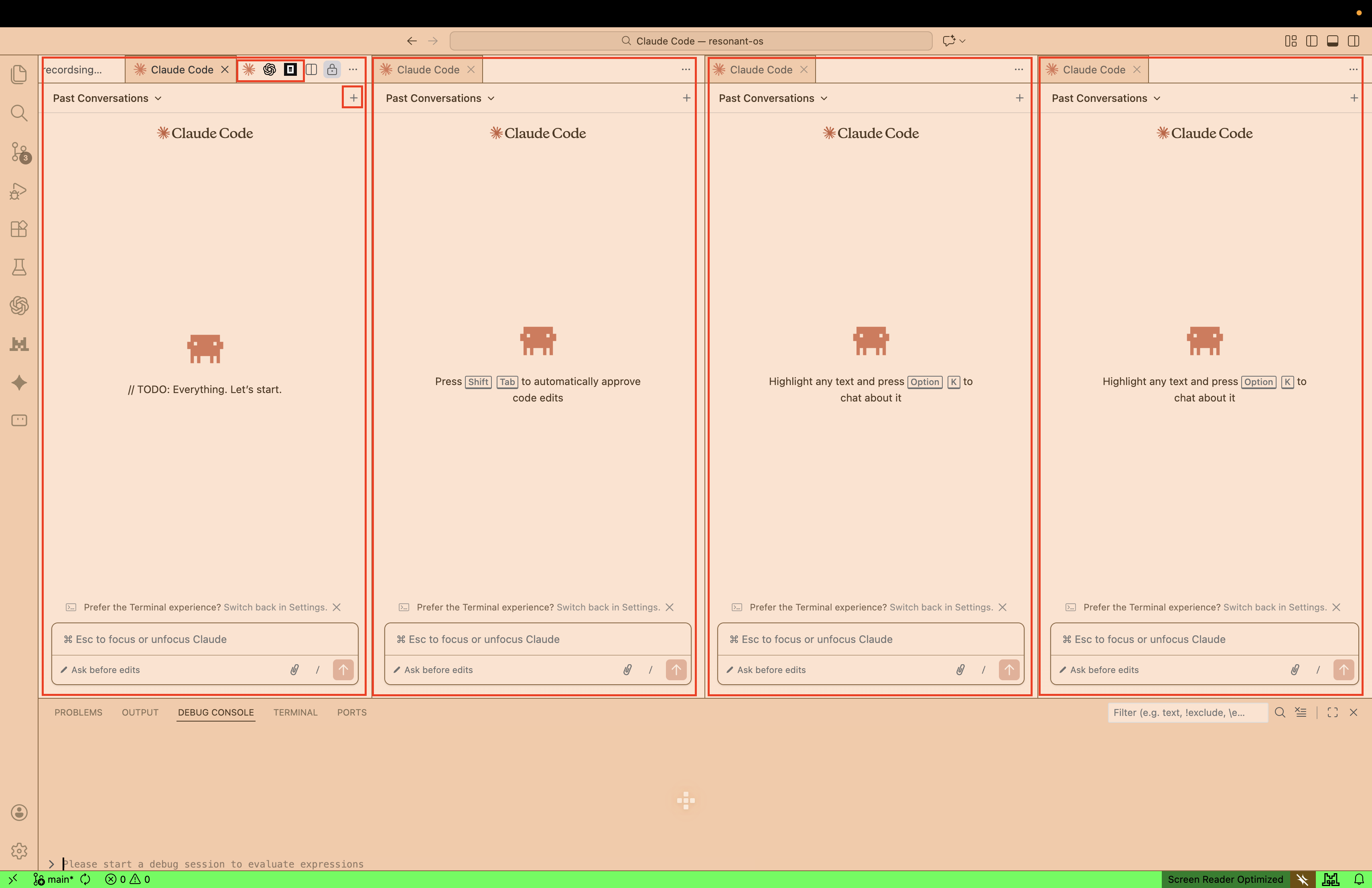
Each agent maintains its own context window. No agent loads the entire codebase. Focus stays tight.
3. Establish a Design Persona
                ╔═══════════════════════════════╗
                ║   "World Class UI/UX Designer" ║
                ╚═══════════════════════════════╝
                              │
        ┌─────────────────────┼─────────────────────┐
        ▼                     ▼                     ▼
┌───────────────┐    ┌───────────────┐    ┌───────────────┐
│  Sub-Agent A  │    │  Sub-Agent B  │    │  Sub-Agent C  │
│  Component    │    │  Layout       │    │  Animation    │
└───────────────┘    └───────────────┘    └───────────────┘
                              │
                ┌─────────────────────────┐
                │  Consistent Standards   │
                │  Grid · Color · Motion  │
                └─────────────────────────┘
Give the agent a role at project start. "You are a world-class UI/UX designer." Ask it to define design standards—grid systems, color theory, motion principles. Sub-agents inherit this persona. Consistency follows.
Three levels of specificity:
Level One: A prompt describing what you want.
Level Two: A role plus standards. Ask: "What are the common techniques in design? How do we achieve visual harmony?"
Level Three: Screenshots. Code snippets from Radix or Tailwind. Links to components you admire. The more concrete the reference, the closer the output.
Do this at project start. If you establish design standards at the end, you get reskins—surface changes to colors and fonts. Structural changes require early definition.
4. Isolate Scope
┌─────────────────────────────────────────────────────┐
│           "Build me an e-commerce platform"         │
└─────────────────────────────────────────────────────┘
                        │
                 Agent interviews you
                        │
                        ▼
    ┌───────────────────────────────────────┐
    │      Isolated: "Product catalog"      │
    └───────────────────────────────────────┘
                        │
                        ▼
        ┌───────────────────────────┐
        │  Task 1: Product model    │
        │  Task 2: List view        │
        │  Task 3: Detail page      │
        └───────────────────────────┘
Ask the agent to interview you before it executes anything. Let it narrow the scope.
"Build me an e-commerce platform" becomes "product catalog" becomes three discrete tasks. Execute them one at a time, or spawn sub-agents for each.
5. Spawn Sub-Agents
                ┌─────────────────────┐
                │    Primary Agent    │
                │    (Coordinator)    │
                └──────────┬──────────┘
                           │
         ┌─────────────────┼─────────────────┐
         ▼                 ▼                 ▼
┌─────────────────┐ ┌─────────────────┐ ┌─────────────────┐
│  Sub-Agent #1   │ │  Sub-Agent #2   │ │  Sub-Agent #3   │
│  agents/ui.md   │ │  agents/api.md  │ │  agents/test.md │
└─────────────────┘ └─────────────────┘ └─────────────────┘
         │                 │                 │
         ▼                 ▼                 ▼
   UI Components      API Routes        Test Suite
Agent swarms will be mainstream by end of 2026. Get ahead now.
Keep an agents/ directory with config files: ui.md, api.md, testing.md. Each file has tailored instructions for that domain. When your primary agent spawns a sub-agent, point it to the relevant config.
One agent becomes an orchestrator. Specialists do the work. No context-switching.
6. The Rule of Threes
Error: "Cannot find module 'xyz'"

Attempt 1: ✗ ─────────────────────────────────► Retry
Attempt 2: ✗ ─────────────────────────────────► Retry
Attempt 3: ✗ ─────────────────────────────────► STOP
                                                  │
                  ┌───────────────────────────────┘
                  ▼
      ┌─────────────────────────────────┐
      │  Analyze root cause             │
      │  Generate permanent fix         │
      │  Log to devlog.md → "Learnings" │
      └─────────────────────────────────┘
Same error three times? Stop retrying. Analyze the root cause. Log the fix to devlog.md.
The system improves itself. Future sessions retrieve this context automatically.
# Skill: Rule of Three Error Handling

When executing code or running tests, maintain a counter for
specific error types encountered during a single session.

If the same error occurs 3 times:
1. Stop execution immediately.
2. Analyze the root cause rather than attempting a fourth retry.
3. Generate a permanent fix.
4. Log the incident in devlog.md under "Learnings"—the error,
   the cause, and the fix.
7. The Documentation Loop
      ┌──────────────┐
      │   Generate   │
      │     Code     │
      └──────┬───────┘
             │
             ▼
      ┌──────────────┐        ┌─────────────────┐
      │   Document   │◄──────►│   agents.md     │
      │   Changes    │        │   devlog.md     │
      └──────┬───────┘        └─────────────────┘
             │
             ▼
      ┌──────────────┐
      │   Refactor   │
      └──────┬───────┘
             │
             └──────► (back to Generate)
Vercel's research shows a well-crafted agents.md outperforms skills in agent evaluations. Skills help. A solid config file helps more.
Keep a devlog.md with timestamped entries. What happened, what was learned, what mistakes were made. This becomes institutional memory. Before starting new work, tell the agent to check the devlog. Point it to what worked. Good patterns get reinforced.
Refactor often. Ask the agent for cleanup sweeps—unused imports, dead code, logical contradictions.
# Skill: Code Hygiene

Run a static analysis scan. Identify:
- Unused imports and undefined variables
- Dead code blocks (unreferenced functions)
- Logical contradictions in config files

For every issue, propose a refactor that removes bloat
without altering core logic.
I use Codex 5.2 for reviews, refactors, and plans. Claude Code and Kimi k2.5 for execution. The more I document, the better it gets. The more hands-off, the more accurate.
8. Optimize Code for Agents
BEFORE                              AFTER
══════                              ═════

src/                                src/
└── app.js (3000 lines)             ├── components/
                                    │   ├── NAV_MAP.md
    Agent loads entire file         │   ├── Header.js
    Context: 45k tokens             │   └── Footer.js
    Agent confused                  ├── hooks/
                                    │   ├── NAV_MAP.md
                                    │   └── useAuth.js
                                    └── utils/
                                        ├── NAV_MAP.md
                                        └── helpers.js

                                    Context: 8k tokens per task
Huge files burn context windows. Split them.
Place a NAV_MAP.md at the top of every directory. The agent reads the map, navigates efficiently, and stays focused.
Ask architectural questions: "What would a senior engineer do? How would a production team structure this?" Agents are good at generating documentation that helps other agents read the codebase. Use that.
9. Use Technologies Agents Know Well
Agent Training Data Coverage
════════════════════════════

Next.js       ████████████████████████░░  High
Ruby on Rails ████████████████████████░░  High
Convex        ██████████████░░░░░░░░░░░░  Good
SvelteKit     ██████████████░░░░░░░░░░░░  Growing
New Framework ███░░░░░░░░░░░░░░░░░░░░░░░  Limited

┌──────────────────────────────────────────────────────┐
│  Knowledge Cutoff: May 2025                          │
│  Agent may reference outdated patterns.              │
│  Force current docs with direct links + versions.    │
└──────────────────────────────────────────────────────┘
Use frameworks with extensive documentation. Next.js. Rails. Convex. Agents have been trained on these.
Watch for training cutoffs. Agents reference 2024 patterns. Force current documentation—provide direct links, specify version numbers, correct outdated suggestions.
Keep tooling consolidated. An agent jumping between disparate ecosystems with varying documentation quality will struggle.
Final Thoughts
┌─────────────────────────────────────────────────────────┐
│                                                         │
│   Claude Code ◄──► Codex 5.2 ◄──► Kimi k2.5 ◄──► ...   │
│                                                         │
│          Try them all. Benchmarks mean little.          │
│          What matters is how it feels.                  │
│                                                         │
└─────────────────────────────────────────────────────────┘
Try everything. Open Code. Z.ai. Gemini. The small GLM models. Make your own harness. Benchmarks tell you almost nothing. What matters is how it feels in your codebase.
Push back against the agent. If something feels wrong, say so. Ask for another pass. Course-correct early. Your intuition matters.
Get Started
Want a template? Check out the Starter Template: agents.md—a reference implementation you can customize.
Or paste this article into a new conversation with your agent: "Help me design a CLAUDE.md for my project based on these strategies." It will ask about your stack, your workflow, and build something tailored to you.
Want to dive deeper? Check out these related posts: